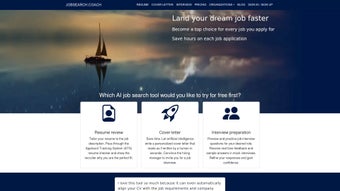

Download JobSearch Coach – AI‑powered job search assistant, resume optimizer, free download
Overview of JobSearch Coach
JobSearch Coach is a full‑version web application designed to streamline every stage of the job‑hunting process. Developed by Andrej Tusicisny, this AI‑driven tool falls under the “AI Text Summarizer” category, but its capabilities go far beyond simple summarisation. Launched on Softonic on August 1st 2024, JobSearch Coach combines intelligent resume analysis, personalised job recommendations, cover‑letter generation, and interview‑question preparation into a single, browser‑based platform. Because it runs entirely in the cloud, users enjoy instant updates, zero installation hassles, and cross‑browser compatibility with Internet Explorer, Firefox, Opera, Safari, and Chrome. The service is marketed as a free, secure, and continuously updated solution for job seekers of all experience levels—from fresh graduates to senior professionals looking to pivot careers. Its intuitive dashboard lets you import your existing CV, set job‑search parameters, and let the AI engine surface the most relevant opportunities while simultaneously polishing your application documents. In short, JobSearch Coach aims to be the personal career coach you wish you had during every application cycle.
Key Features That Set JobSearch Coach Apart
- AI‑Powered Resume Analyzer: Upload your CV and receive instant feedback on keyword density, format, and ATS compatibility.
- Smart Job Matching: The algorithm scans thousands of listings, filters them by your skill set, location preferences, and salary expectations, and presents a curated shortlist.
- Automatic Cover‑Letter Builder: Generate customised cover letters in seconds, with tone‑adjustable options (formal, conversational, creative).
- Interview Question Generator: Based on the job description, the tool predicts likely interview questions and suggests concise, impact‑driven answers.
- Progress Tracker: Keep a visual log of applications sent, responses received, and follow‑up reminders.
- One‑Click Export: Export polished resumes and cover letters to PDF, DOCX, or directly to LinkedIn profile.
- Multi‑Language Support: Supports English, Spanish, German, French, and Italian, making it useful for global job markets.
- Secure Cloud Storage: All documents are encrypted in transit and at rest, complying with GDPR and CCPA standards.
- Regular Updates: The platform receives weekly AI model improvements and new feature rollouts without any user intervention.
The feature set is deliberately designed to reduce the time spent on repetitive tasks, allowing you to focus on networking and interview preparation. By centralising resume optimisation, job discovery, and application drafting, JobSearch Coach becomes a single point of truth for your entire job‑search workflow.
Installation, Usage Instructions, and Compatibility
Because JobSearch Coach is a web‑based application, there is no traditional installation process. Getting started is as simple as visiting the official URL, creating a free account, and verifying your email address. Once logged in, you’ll be guided through a short onboarding wizard that asks for basic career information, preferred job titles, and geographic preferences. After completing the wizard, you can immediately upload your existing resume or start building one from scratch using the built‑in template library.
For users who prefer a more structured workflow, the platform offers a “Step‑by‑Step” mode that walks you through each stage—resume analysis, job matching, cover‑letter creation, and interview prep—while displaying progress percentages. The responsive design ensures a seamless experience on desktops, laptops, tablets, and smartphones. All major browsers are supported, including Internet Explorer (11+), Firefox, Opera, Safari, and Chrome, so you won’t encounter compatibility issues regardless of your preferred environment.
Operating System Compatibility: Since JobSearch Coach runs in the browser, it is compatible with Windows 10/11, macOS 10.15+, Linux distributions with a modern browser, Android 8.0+, and iOS 13+. The only requirement is an active internet connection for real‑time AI processing and cloud storage access.
To ensure security, the platform enforces HTTPS connections and uses two‑factor authentication (2FA) for account protection. If you ever need to export your data, the “Data Download” option in the settings menu provides a complete zip file containing all your resumes, cover letters, and activity logs.
Pros, Cons, Frequently Asked Questions, and Final Thoughts
Pros
- Completely free core functionality with no hidden fees.
- AI-driven insights that dramatically improve ATS compatibility.
- All‑in‑one platform eliminates the need for multiple separate tools.
- Cross‑browser and cross‑device compatibility ensures accessibility.
- Secure, GDPR‑compliant data handling builds user trust.
Cons
- Requires a stable internet connection for AI processing.
- Advanced premium templates are locked behind a future paid tier (not available at launch).
- Limited offline functionality compared to desktop‑only resume builders.
FAQ – Your Questions Answered
Is JobSearch Coach really free?
Yes, the full‑version web app is offered at no cost. Future premium features may be introduced, but the core AI resume and job‑matching tools remain free.
Can I use JobSearch Coach on my mobile device?
Absolutely. The responsive design works on Android and iOS browsers, giving you full functionality on smartphones and tablets.
How secure is my personal data?
All data is encrypted in transit (TLS) and at rest. JobSearch Coach complies with GDPR and CCPA, and two‑factor authentication is optional for added protection.
Do I need to create an account to use the AI features?
Yes, a free account is required to store your documents securely and to enable personalized AI recommendations.
Will JobSearch Coach work with older browsers like Internet Explorer?
The platform supports Internet Explorer 11 and newer, as well as all modern browsers (Chrome, Firefox, Safari, Opera). For the best experience, we recommend using the latest version of Chrome or Firefox.
Conclusion – Should You Download JobSearch Coach?
JobSearch Coach delivers a compelling mix of AI‑driven resume optimisation, smart job matching, and interview preparation—all within a secure, browser‑based environment. Its free pricing model, cross‑platform compatibility, and regular updates make it an attractive option for anyone serious about accelerating their job search. While a constant internet connection is a prerequisite and premium templates may eventually cost extra, the core functionalities are more than sufficient for most job seekers. If you’re looking for a unified, intelligent career‑coaching tool that removes the guesswork from applications, download JobSearch Coach today and start turning opportunities into offers.



.png)



